Unless you print all badges at the registration desk or you don’t need badges with names or other data, you have to prepare a solution for on-site printing. Mostly for last minute attendees and fixing any errors on the pre-printed ones. We will offer 3 solutions taking into account speed, attendee numbers and difficulty.
Key Points
- On-site printing solutions are primarily required to accommodate unexpected last-minute attendees and to correct errors on pre-printed badges.
- Self-service registration kiosks are typically reserved for large events with over 1500 visitors or professional venues with established infrastructure.
- The most reliable low-tech solution involves ordering pre-printed blank badges and handwriting attendee data with a marker.
- Handheld label makers provide a professional appearance without requiring internet connectivity, though they offer limited font formatting options.
- Using standard laser or inkjet printers on-site offers the highest quality appearance but carries significant risks regarding technical setup and network failures.
Let’s start with the basics: When do you need on-site badge printing?
Registration and checking in people is often the first real interaction with your attendees. The process and focus should be on efficiency and minimising waiting time. This initial touchpoint is also where you begin to establish a controlled environment, which is the foundation for creating secure badges and preventing unauthorized access. There are two scenarios where you don’t have to worry about it:
- Badges only used for categorising people (like Attendee, Sponsor, Speaker) and have no personal data on them.
- Registration via self-service kiosks that do the event badge and conference printing. That’s usually common for large events (1500+ visitors) or professional venues who have the machinery in place.
You need to be ready to solve the “onsite problem” – there are always people who arrive unexpectedly or have not pre-registered.
How to pick the solution that fits your needs?
Here are the questions that help to give context and pick a solution. Using a comprehensive event badge production checklist can help answer these questions thoroughly:
- How many people are you expecting and how many do you think will pre-register?
- How long is the period between the event and the registration closing?
- How many people will be working at the registration desk?
- Do you have access to printers, computers and the Internet?
- How important is branding and professionalism for the event?
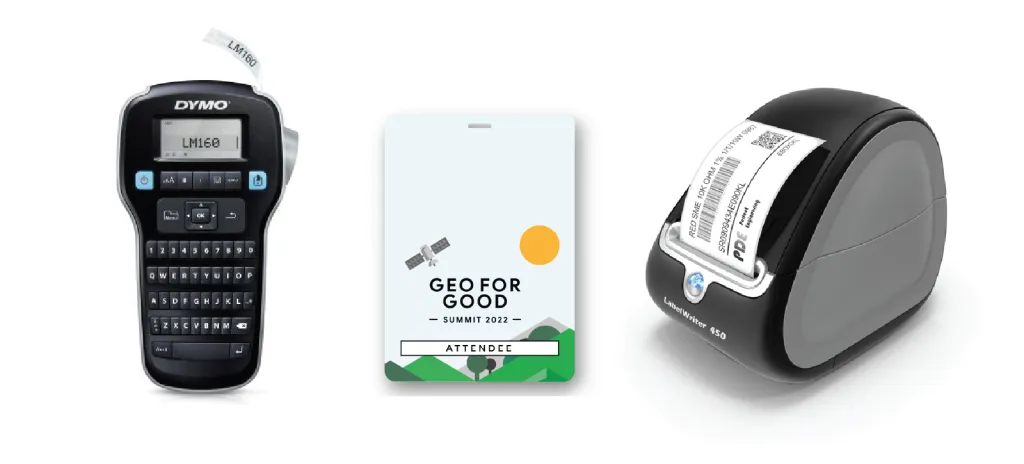
Simple solution: Pre-printed badges + a marker to write on them
That solution involves ordering blank, customized badges with a predefined design but no personalised data. Attendee information can be hand-written on the badge using a marker upon arrival. This method is quick and straightforward, minimising potential issues or errors.
Professional but not risky solution: Handheld label makers
When hand-writing isn’t enough, using handheld label makers that don’t need connectivity is the more professional option. It requires additional devices but gives a more professional look and feel. The machines are fairly cheap and fast to operate. The main downside is the lack of formatting options – You can only choose from a few fonts and secondly, if the number of latecomers is very high, you can’t have just one of these devices – You need several devices and personnel to be efficient.
Professional but high-risk solution: Printing labels with a printer
Implement a laser/inkjet printer or an industrial label printer setup to print directly onto Avery labels (or similar) for the best appearance. While this method is highly professional, it carries risk due to potential technical challenges with printers and networks. Every error will slow down the process and increase waiting time. This method is only reasonable when you have to print for a lot of people. To be successful, you need to run test printings and be ready to troubleshoot on the go, avoiding common badge printing mistakes. If going with the high-risk option, always have a backup plan.
FAQ
Why is an on-site badge printing solution necessary?
On-site printing is essential for processing attendees who arrive without pre-registering and for instantly fixing typos or errors on pre-printed badges.
What is the simplest method for creating badges on-site?
The most straightforward solution is to use pre-printed badges that feature the event design but have blank spaces for staff to handwrite names using a marker.
What are the limitations of using handheld label makers for events?
While label makers do not require internet connectivity, they are limited by a lack of formatting options and the need for multiple devices to handle large crowds efficiently.